How to automate lab workflows without robotics
Most of the manual effort in a QC or development lab isn’t moving samples around. It’s reading values off instrument displays, writing them down, copying them into spreadsheets and the LIMS, checking calculations and chasing missing records. You can automate all of that without a single robot.
Three things do most of the work: connect the instruments you already have, run the SOP as a guided digital workflow, and send results to your LIMS automatically. Robots still make sense for high-throughput, repetitive handling. For weighing, pH, titration and most other bench work, connecting instruments and digitising the procedure is usually the quicker and cheaper first step.
Automation isn’t only robots
When people hear “lab automation” they picture liquid handlers and robotic arms. Those machines automate the physical handling. In most labs, though, the physical steps aren’t the bottleneck. A typical weighing or titration takes minutes. Recording it, calculating the result, typing it into the LIMS and getting it reviewed takes much longer.
Each of those manual steps is also a chance for error: a transposed digit, a value copied into the wrong cell, a calculation done with an out-of-date formula. They are where most data integrity findings come from, as we describe in The execution gap in regulated laboratories.
Automating them doesn’t need new hardware. Most balances, pH meters and titrators already have a data interface. What’s missing is the software layer that takes the reading straight into the right step of the procedure. Some people call this micro-automation.
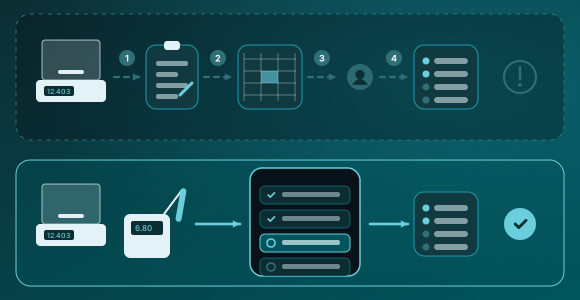
Manual bench tasks and how to automate them
The tasks below take up most of an analyst’s day in a typical QC lab. None of them need a robot.
| Manual task today | How it’s automated | What changes |
|---|---|---|
| Reading values off a display or printout | The instrument sends the reading straight into the current workflow step | No transcription errors, and the raw value is kept with its timestamp |
| Calculating results in a spreadsheet | The workflow calculates as the analyst goes, using one controlled formula | No uncontrolled spreadsheets, and the same calculation every time |
| Checking calibration and reagent expiry | The workflow checks equipment and material status before the step can start | Out-of-date equipment or reagents can’t be used by mistake |
| Following a paper or PDF SOP | The SOP becomes a guided, step-by-step workflow on a tablet or PC | Steps are done in the right order, and new staff get up to speed faster |
| Typing results into the LIMS | Approved results are sent to the LIMS through its interface | No double entry, and results reach the LIMS sooner |
| Reviewing paper records | Reviewers check a complete electronic record, with any limit violations already flagged | Shorter review, and fewer queries back to the analyst |
| Checking fridges, freezers and incubators by hand | Sensors log temperatures continuously and send alerts | Gaps in the record and missed excursions are avoided |
For everything a lab execution system does at the bench, see What is a Lab Execution System (LES)?.
What it takes to automate without robots
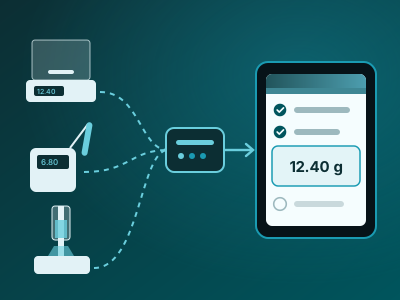
Connect the instruments you have
Most bench instruments can send data over RS-232, USB or the network. A connectivity layer reads that data and turns it into structured values. Open standards such as SiLA 2 and OPC UA LADS make this easier for newer instruments. Older ones can usually be connected with a small hardware adapter.
Check first which of your instruments are used most, and what interfaces they have. A short list of high-volume instruments usually covers most of the manual entries.
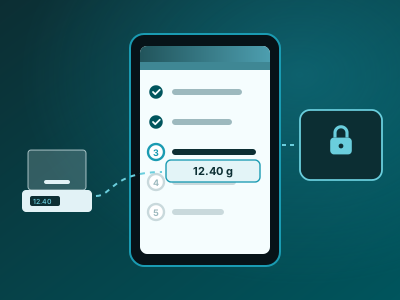
Turn the SOP into a guided workflow
A lab execution system (LES) turns the SOP into steps on screen that read the instrument and check limits as the analyst works. Our guide What is a Lab Execution System (LES)? explains how.
Data integrity follows. Because each step is recorded as it happens, the record builds itself. See How ALCOA+ supports bench data integrity in pharma QC.
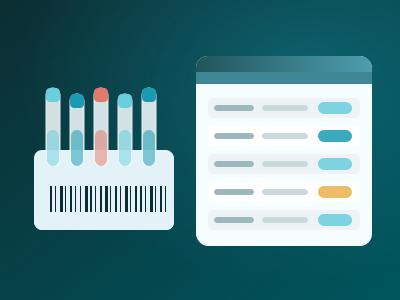
Send results where they belong
Once results are captured electronically, they can go straight to the LIMS, ELN or data platform through their interfaces, together with the context of how they were produced.
Robots fit in later. If you add a robot for a high-volume step, it can become one step in the same workflow, rather than a separate island. More on this in Lab automation: the missing layer.

SiLA 2, from the SiLA Consortium
OPC UA LADS, initiated by SPECTARIS with VDMA and the OPC FoundationA practical path for your first workflow
We see the best results when labs start small, with one busy workflow, and expand from there:
- Pick one high-volume workflow with lots of manual entries, such as sample weighing, pH measurement, Karl Fischer or titration.
- List the instruments involved and their interfaces. Note which values are typed in today and where they end up.
- Map the SOP into steps, with the checks, limits and calculations each step needs.
- Connect the instruments and run a pilot alongside the current process, so analysts can give feedback before go-live.
- Validate and go live, using a risk-based approach that focuses on the steps that affect product quality and data integrity.
- Measure and extend: count the manual entries removed, review time and deviations, then move on to the next workflow.
Robots make sense when volumes are high, steps are highly repetitive, the work is hazardous, or it has to run around the clock. Even then, the data handling around the robot still needs to be automated.
How LabOperator does this
LabOperator is our vendor-independent lab execution and connectivity platform. Lab experts build SOP workflows without writing code, and analysts follow them step by step at the bench. Readings come straight from the instrument, checks and calculations run as the work is done, and every step is recorded with a full audit trail and e-signatures.
LabOperator has connected more than 1,000 laboratory devices in research, R&D and pharma labs, and its device portfolio covers over 95 equipment manufacturers. Instruments connect through LabOperator Connector Boxes or open standards such as SiLA 2 and OPC UA LADS, and LabOperator works with the LIMS and ELN you already run. When you do add robots, they can be steps in the same workflow.
Talk to us about a first workflowSee supported instrumentsRead the LEHVOSS case study
Related guides and articles
Common questions
Can you automate a lab without robots?
Yes. In most labs the biggest manual effort is data handling rather than physical handling: reading values, writing them down, calculating and typing results into other systems. Connecting instruments and running SOPs as guided digital workflows automates that work without any robotics.
Which lab workflows should we automate first?
Start with a busy workflow that has many manual entries and uses instruments with a data interface. Sample weighing, pH measurement, Karl Fischer and titration are common first choices because they run every day and are easy to measure before and after.
Do we need to buy new instruments?
Usually not. Most balances, pH meters and titrators can send data over RS-232, USB or the network. Older instruments without a usable interface can often be connected with a small hardware adapter. Check the interface of your highest-volume instruments first.
How does this help with data integrity?
Values are taken straight from the instrument, so there is nothing to transcribe, and each step is recorded as it happens. We go through each ALCOA+ principle in How ALCOA+ supports bench data integrity in pharma QC.
Does it work in GMP labs and under 21 CFR Part 11?
Yes, provided the system has audit trails, electronic signatures and access controls, and is validated for its intended use. See the text of 21 CFR Part 11 and how LabOperator maps to 21 CFR Part 11.
Can we add robots later?
Yes. If the workflow is already digital and instruments are connected, a robot can become one more step in it. Open standards such as SiLA 2 make it easier to bring robots and instruments from different vendors into one workflow.
How do we measure the benefit?
Count the manual entries you remove per run, measure review time per batch or sample, and track transcription-related deviations. Measure them before the pilot so you have a baseline.